Build Smarter Operations Through AI, Data, and Process Excellence

From foundational workflows to advanced automation, we guide organizations through every stage of operational and AI maturity -- solving complexity with precision and unlocking measurable business value.

Our Clients

A logo for tulsa international airport with a rainbow of colors
A cortland international company logo on a white background.
The grand bank logo has a lion on it.
The logo for nexus energy partners is blue and white.
A logo for a company called stone distributing with a dragon on it.
A black and white logo for vmg on a white background.

Imagine a future where your data works harder, your processes run smoother, and your team spends less time chasing fire drills -- and more time driving strategy.


For our clients, this isn't a pipe dream. It's reality when you focus on building the operational maturity of your organization.

What We Deliver

Case Studies

Cloud Migration Plan

We helped The Alliance scope and plan an Azure cloud migration. Download the case study below.

LEARN MORE

Project Management Office Implementation

We assisted AllCare Health with the creation and implementation of a PMO office. Download the case study below.

LEARN MORE

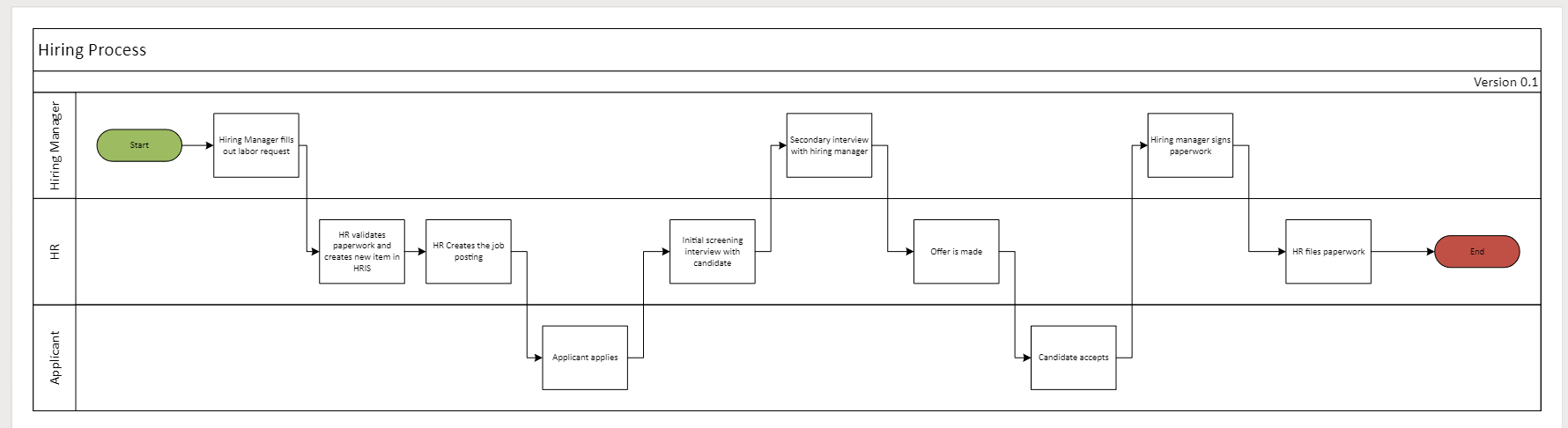
Process Documentation & Current-State Evaluation

We helped a healthcare organization clearly map current-state processes, define KPIs, build initial Power BI environment, and identify automation opportunities. Download the case study below.

LEARN MORE

ETL & Power BI Development

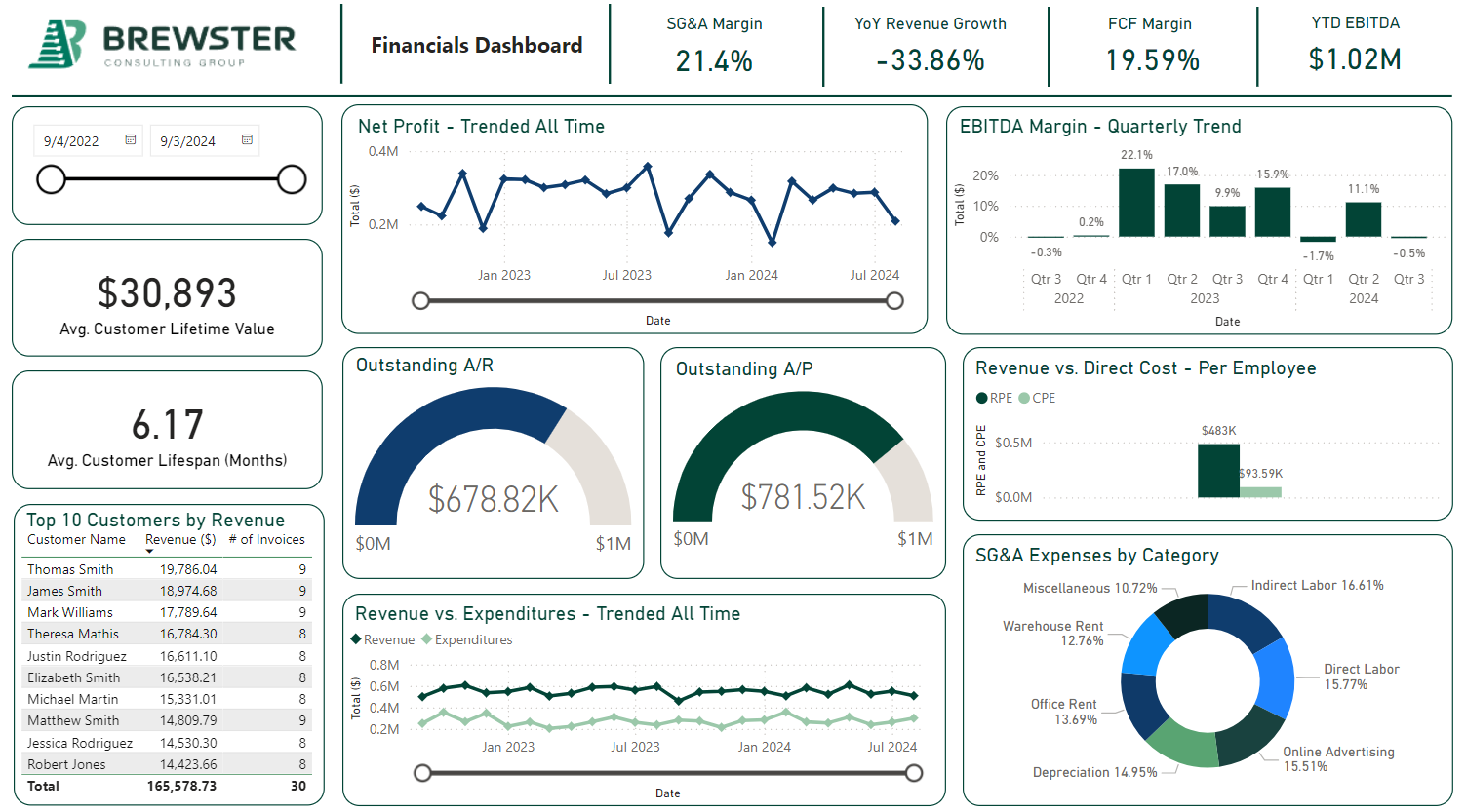
We helped VMG build a scalable ETL process to clean 17+ million records and helped build Power BI reporting on top. Download the case study below.

LEARN MORE

Data Warehouse Build

We helped a regional bank build a data warehouse and reporting. Download the case study below.

LEARN MORE

Enterprise IT Consolidation

We led project management on the post-merger integration of 11 different companies into a single technical tenant. Download case study below.

LEARN MORE

Ready to build operational intelligence and drive scalable growth?

Whether you're stuck in spreadsheets or ready for real-time automation, we meet you where you are.

Hear More From Us:

By Ranae Peterson January 27, 2026
Introduction: Many businesses do not struggle because they lack tools; they struggle because the tools they have are not being used effectively. As organizations grow, file chaos, compliance risk, and disconnected systems become more than inconveniences; they become operational liabilities. SharePoint is often positioned as a solution to these challenges, but only when it is implemented with intention. This post examines three common business pain points and illustrates how a well-designed SharePoint environment can directly address each one. Use Case #1: Files That Are Difficult to Locate and Manage As businesses expand, documents tend to spread across shared drives, inboxes, personal folders, and cloud storage tools. Over time, this creates an environment where employees are unsure which version of a document is current, where critical files are stored, or who owns them. Teams often resort to recreating work or interrupting colleagues simply to locate information. The impact of this problem goes far beyond inconvenience. Employees lose valuable time searching for documents; outdated information is unintentionally used, and collaboration slows down. Decision-making becomes reactive rather than informed because information is not readily accessible. When implemented correctly, SharePoint provides a structured, centralized environment for document management. Instead of relying solely on folder structures, SharePoint uses metadata, content types, and intelligent search to organize information. Version control ensures there is always a clear source of truth, while permissions ensure access is appropriate. The result is an environment where employees can find what they need quickly, without knowing exactly where it lives.
By Ranae Peterson January 23, 2026
Many small and mid-sized business (SMB) leaders are familiar with Microsoft SharePoint, yet far fewer understand whether it is the right fit for their organization, what a SharePoint consultant does, or what SharePoint consulting services look like in practice. SharePoint is a powerful platform, but it is also one of the most underutilized tools within Microsoft 365. In many cases, businesses attempt to implemen t a simple version of SharePoint on their own, only to find tha t employee adoption is low; processes remain inefficient, or the return on investment falls short of expectations. These challenges are rarely caused by technology itself. More often, they stem from a lack of clear strategy, thoughtful design, and structured execution. This is where SharePoint consulting firms play a critical role. Whether a business has never used SharePoint before or has struggled with a previous implementation, working with a SharePoint consultant can help unlock the platform’s full value. A consultant brings the expertise needed to design, organize, and develop a SharePoint environment that aligns with how the business actually operates, improving document management, collaboration, governance, and long-term scalability. What Is SharePoint Consulting? -SharePoint consulting services focus on helping organizations design, implement, and optimize SharePoint in a way that supports business processes, not just IT requirements. -A SharePoint consultant acts as a strategic partner, guiding organizations through everything from planning and governance to customization, rollout, and adoption. -Rather than delivering a one-size-fits-all solution, effective SharePoint consulting starts with understanding the business’ pain points and translating them into a structured, sustainable SharePoint environment. What Does a SharePoint Consultant Do? A SharePoint consultant is an experienced professional with deep knowledge of the SharePoint platform and its integration within Microsoft 365. More importantly, they understand how to connect technical capabilities with real business needs. A strong SharePoint Consulting Firm will: Take time to understand current challenges and inefficiencie s as well as the goal future state Clearly outline the steps required to organize and implement an improved SharePoint environment Design a solution that is easy to maintain and scale Develop the designed SharePoint environment Train both technical and non-technical support teams to manage the environment Ensure the platform is adopted, not just deployed Successful consulting engagements consider far more than technical setup. They account for organizational buy-in, user understanding, training, and long-term governance. Key capabilities businesses should expect include: A clear and structured implementation approach Strong governance and information architecture design Thoughtful change management and user training Access to SharePoint development services when customization, automation, or integrations are required How A SharePoint Consultant Assesses a Business A well-executed SharePoint consulting engagement typically follows a phased approach. Discovery & Assessment The process begins with an initial discovery phase. During this stage, the SharePoint consultant meets with key stakeholders to understand current workflows, pain points, and any existing SharePoint or Microsoft 365 setup. Together, they identify high-impact use cases, such as document management, permissions, workflows, intranet needs, or collaboration challenges, and prioritize them based on business value. From this, the consultant can design a draft environment to meet the organization’s unique needs. Build & Implementation Next comes the build phase, where SharePoint is configured according to a clearly defined roadmap. This includes: Site and hub structure Navigation and information architecture Metadata, content types, and search optimization Permission and access models aligned with the organization In many cases, this phase may also involve SharePoint development services, such as custom solutions, automated workflows, or system integrations that extend SharePoint’s functionality.  Adoption & Optimization The final phase focuses on rollout, adoption, and continuous improvement. The SharePoint consultant supports: Content migration and cleanup Governance establishment User training and documentation Post-launch feedback and optimization This phase ensures that SharePoint is not only implemented but actively used and continuously improved over time. Why Businesses Work with SharePoint Consulting Firms One of the most important reasons businesses choose to work with a SharePoint consultant is that the consultant bridges the gap between business needs and technical execution. Without this bridge, SharePoint often becomes just another underused tool. Businesses typically benefit from consulting services when they experience challenges such as: No streamlined or consistent approach to file and document management An existing SharePoint environment that is poorly adopted or inconsistently used Multiple versions of documents that are difficult to locate Teams building manual workarounds outside of SharePoint SharePoint Consulting Is Not Just for Large Enterprises A common misconception is that SharePoint consulting is only necessary for large organizations. In reality, SMBs often benefit the most from working with SharePoint consulting firms. For small and mid-sized businesses, SharePoint cons ulting provides: Scalable designs that grow with the organization Cost-effective customization tailored to real needs Faster user adoption and reduced resistance Less rework and fewer costly fixes over time Results Businesses See from SharePoint Consulting Services When implemented strategically, SharePoint delivers measurable business value. Organizations that invest in SharePoint consulting services often experience: Significant time savings Reduced operational friction Improved collaboration across teams Stronger governance and security Higher overall ROI from Microsoft 365 Next Steps for a Business Considering SharePoint Consulting SharePoint is a powerful platform, but its success depends on strategy, structure, and adoption. A SharePoint consulting firm helps ensure your environment is built to support real workflows, scale with your organization, and drive long-term ROI. If your business is ready to move beyond underused tools and manual workarounds, partnering with a SharePoint consultant can help you turn SharePoint into a system that truly works for your team. Contact us today to get started!
By Ranae Peterson January 12, 2026
Duplicated files, inconsistent folder structures, and undocumented processes, often stored as tribal knowledge in the minds of a few employees, undermine productive data storage and effective information use. As organizations grow, these challenges compound, slowing onboarding, increasing rework, and creating unnecessary operational friction. In 2026, remaining competitive requires moving beyond basic storage solutions. Microsoft SharePoint for small business operations offers a modern alternative. It has evolved into a dual-purpose platform that functions as both a company intranet and a centralized document repository, supporting collaboration, governance, and scalability. This guide explores common data storage challenges faced by SMBs, how SharePoint Intranet and SharePoint Document Repositories work, and the best practices and pitfalls to consider when implementing SharePoint effectively. Common Data Storage Pain Points for SMBs Organizations relying on basic or legacy storage solutions often encounter several recurring issues: • Disorganized and scattered files Inconsistent folder structures and unclear naming conventions make it difficult for employees, especially new hires, to locate relevant information. • Duplicate content and version confusion Multiple versions of the same document create rework, reduce trust in information, and slow decision-making. • Permission complexity Poorly managed access controls result in security risks, accidental oversharing, and administrative overhead. • Inefficient onboarding New employees spend excessive time navigating legacy file systems rather than focusing on productive work. Ultimately, a lack of organization and governance limits the effectiveness of data storage systems across the business. The Value of SharePoint for SMBs Microsoft SharePoint is a web-based collaboration and document management platform designed to securely store, organize, and share information. As part of the Microsoft 365 ecosystem, it integrates seamlessly with tools such as Teams, Word, Excel, and OneDrive. SharePoint delivers value to SMBs through two primary capabilities: the SharePoint Intranet and the SharePoint Document Repository . Value of SharePoint Intranet A SharePoint intranet serves as a centralized hub for communication, collaboration, and information sharing across the organization. Key benefits include: • A single source of truth for policies, procedures, company news, and official documentation • Reduced information silos and fewer outdated or conflicting files • Improved efficiency through workflow automation and approval processes • Advanced search functionality to quickly surface critical information • Enhanced engagement through news feeds, leadership updates, and social interaction features As a cloud-based platform, SharePoint ensures consistent access to information regardless of location or device, supporting both in-office and remote teams. Value of SharePoint Document Repository SharePoint’s document repository capabilities are designed to modernize document management and improve operational efficiency. Key advantages include: • AI-powered document intelligence , leveraging tools such as Microsoft Copilot and SharePoint Premium to extract data, apply metadata, and generate summaries • Improved governance through automated tagging and classification • Time and cost savings by reducing manual file management and duplication • Real-time co-authoring and version control, enabling multiple users to collaborate on the same document without creating duplicates These features help organizations move beyond simple file storage to structured, searchable, and governed content management. How SharePoint Works in Practice SharePoint can be thought of as a digital office building: • Sites represent dedicated spaces for teams, departments, or projects • Libraries function as filing cabinets used to store and organize documents • Pages act as notice boards for announcements, links, and key resources Microsoft Teams and OneDrive are built on top of SharePoint. Creating a new Team automatically provisions a SharePoint site, while OneDrive serves as a private workspace for drafts and individual files until they are ready to be shared. Best Practices for SharePoint Success To maximize the value of SharePoint, organizations should follow several proven best practices. Focus on Flat Architecture - Avoid deep folder hierarchies and nested site structures. Instead: • Use flat site architecture with hub sites • Limit folder depth to improve navigation • Rely on metadata for filtering and organizing content dynamically Manage Permissions Thoughtfully • Assign permissions to groups, not individuals • Grant users the minimum access required for their role • Create dedicated sites for external collaboration to prevent accidental oversharing Be Proactive with Governance • Implement retention policies and labels to automate content lifecycle management • Standardize naming conventions for sites and files • Conduct regular audits to remove inactive users and review permissions Adopt a People-First Approach • Identify departmental “super users” to support adoption • Design intranet pages around common tasks • Invest in ongoing training to ensure consistent usage and engagement Common Pitfalls to Avoid Even well-intentioned SharePoint implementations can fail without proper planning. Architectural and Management Issues • Migrating legacy network drives directly into SharePoint without redesign • Overly deep folder structures that hinder navigation • Unrestricted site creation leading to abandoned or duplicate sites Permission and Security Mistakes • Breaking permission inheritance at the file or folder level • Assigning access directly to individuals instead of groups Usability and Governance Gaps • Treating SharePoint as a file dump rather than a structured platform • Over-customizing sites, which can impact performance • Neglecting retention policies, resulting in outdated search results and higher storage costs Integrating SharePoint into the Business Successful SharePoint adoption requires a structured rollout approach, such as a 30/60/90-day plan or a phased implementation path. Five-Step Implementation Path 1. Discover – Define how SharePoint will support business objectives 2. Design – Establish flat architecture, hub sites, and governance standards 3. Build – Configure sites, security, and compliance controls 4. Migrate – Audit and clean data before migration, map metadata 5. Train & Support – Build user adoption through training and peer support Why Invest in SharePoint Consulting Implementing SharePoint effectively can be complex, particularly for SMBs balancing growth and limited internal resources. SharePoint consulting services provide the expertise needed to design, implement, migrate, and govern the platform successfully. From assessments and architecture design to migration and long-term governance, Brewster Consulting Group supports organizations at every stage, ensuring SharePoint becomes a strategic asset rather than another underutilized tool. Schedule a brief chat with us today to get started!
Show More